
Want to buy a Nike product but can’t find it in Nike Romania stores? Read this tutorial and learn how to download the Nike SNKRS app from the App Store in Romania. The Nike SNKRS app is not available in Romania, as our region only has access to Nike SNKRS through the browser. However, stock is much larger on the app, which is where the most anticipated limited editions are released. After reading the guide below, you will know exactly how to download Nike SNKRS on your phone.
Where is the SNKRS App available?
The Nike SNKRS app is only available in the following countries: America, Austria, Belgium, Czechia, China, Denmark, Finland, France, Germany, Greece, Ireland, Italy, Japan, South Korea, Luxembourg, the United Kingdom, the Netherlands, Poland, Portugal, Spain, Sweden, Slovenia and Hungary.
Note: After you download the app you will need an address in one of the countries mentioned for delivery of purchased products.
How to download Nike SNKRS on iOS
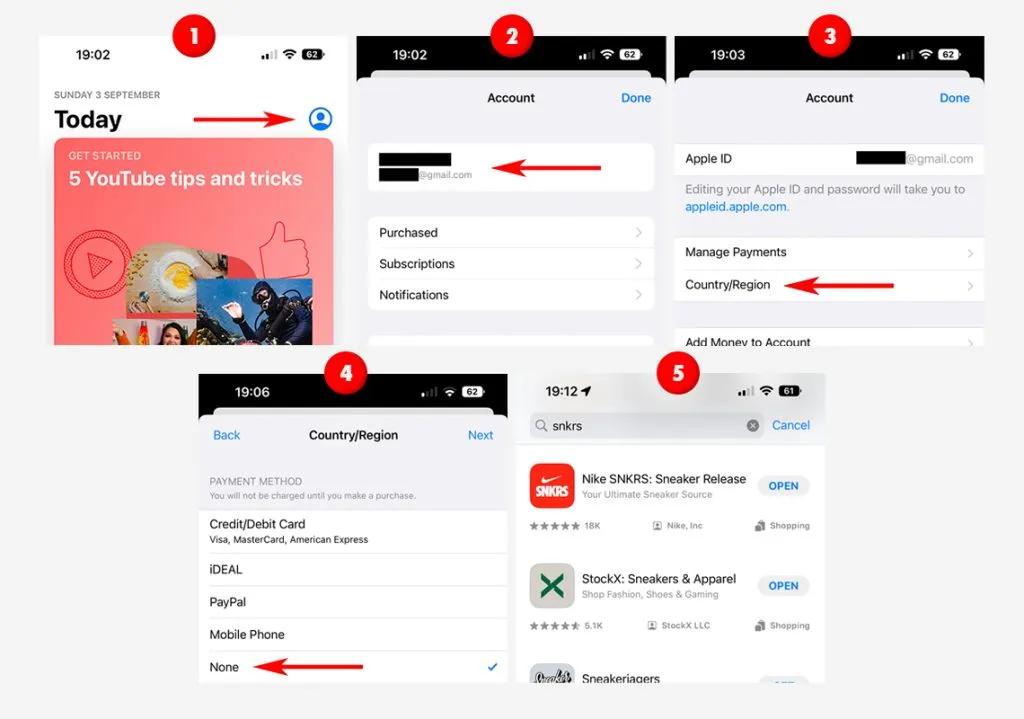
As mentioned above, the app is not directly available in the Romanian App Store. To download it you need to change the region of your Apple ID, or create a new Apple account (with an unused email address). The account must be set to a region where the app is available – for example, Italy, France, Spain or Germany.
Note: It does not matter which region you choose as long as the app is available there – the region of your Apple account is not linked to the region of your Nike account, which means you can download the app from the German App Store and then take part in launches in any other region within the app, since stock is the same across all regions.
In the steps below you will change your region on the App Store – this can only be done if you do not have active subscriptions through the Apple Store (such as Apple Music, Books, etc). If you are unable to change the region, you will need to create a new Apple account.
Using any device, go to the Apple ID page and register using an unused email address. It is very important to select a country from the list of countries where the Nike SNKRS app is available. If you select a different country you will not be able to download the app.
How to download Nike SNKRS on Android
Using your Android device, download the application from the official app store or find the current version "APK" file online and download it. After you have downloaded the app, you can install it and sign in using your Nike account.
Note: Keep in mind that you will need to download any app updates the same way if you download the APK file online – it will not update itself.